Icon of program: HS CleanDisk Pro

HS CleanDisk Pro for Windows

  • Trial version
  • 2.6
    6
  • 4.1K
  • V6.22

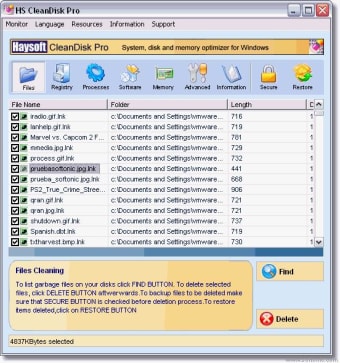
HS Cleandisk is a Windows system optimizer which cleans hard disk and system registry, optimizes memory, adjust system specific settings, accelerates internet connection, maintains security as well as un-installing software no longer wanted.

It automatically detects the system and dynamically organizes itself accordingly. In short, it is a great all-in-one package.

Available Functions are:

FILE FUNCTIONS

  • File Cleaning : Search and Delete garbage, temporary files, cookies and invalid shortcuts which occupy the drives.

  • Duplicate Finder: Search and Delete files which have the same copy on the disk. (Red,Yellow,Green Icons representing how secure is to delete them)

  • Shared Folders: Locate and Disable folders which can be seen and shared by others

  • Wipe Files: Permanently delete files so they cannot be recovered even by using restoration software.

REGISTRY CLEANING

Registry Cleaning :Search and Remove invalid entries in system registry.

SOFTWARE UNINSTALLER

  • Software Uninstaller List and Uninstall software installed on the system. Detailed information such as their install location and occupied size are available.

RESOURCES

  • CPU Information

  • Driver Information

  • Memory Defragmenter: Reclaim unused memory left from dead applications in other words, increase free memory size

  • Folder Usage: Pie chart representation of all directories located on drives. Useful when largest folders on the system are needed.

  • Folder Explorer: Sorted view of all file system. Useful when largest files or folders on the system are needed.

ADVANCED FUNCTIONS(Red,Yellow,Green Icons representing how secure is to apply them)

  • Functions: More than 10 useful Windows default tools to keep system stable and healthy: such as check disk and disk defragmenter utilities
  • Optimization: Various system, memory, cpu optimization tweaks
  • Security: Various tweaks for increasing security while using internet
  • Cleaning: Cleaning history of various applications and clipboard cleaner
  • Internet Accelerator: Tweaks related to internet connection to improve internet browsing
  • Misc: More than 10 useful tweaks related to different area or the system.
  • Applied Tasks: All applied tweaks described above can be listed in this section.

 0/1

App specs

  • License

    Trial version

  • Version

    6.22
  • Latest update

  • Platform

    Windows

  • OS

    Windows XP

  • Language

    English

    Available languages

    • English
    • Spanish
  • Downloads

    4.1K

  • Size

    4.12 MB

  • Developer

Program available in other languages


Icon of program: HS CleanDisk Pro

HS CleanDisk Pro for PC

  • Trial version
  • 2.6
    6
  • 4.1K
  • V6.22

User reviews about HS CleanDisk Pro

Have you tried HS CleanDisk Pro? Be the first to leave your opinion!

Add review

You may also like

Explore Apps

Latest articles

Laws concerning the use of this software vary from country to country. We do not encourage or condone the use of this program if it is in violation of these laws.
Softonic

Is HS CleanDisk Pro safe?

99/100

Score result: Clean

This file passed a comprehensive security scan using VirusTotal technology. It is safe to download.

  • Virus free
  • Spyware free
  • Malware free
  • Verified by Security Partners

    VirusTotal logo

Scan Info

Last scan
Tuesday, December 12, 2023
Scan provider
VirusTotal · Full report

File Integrity

File
cleandiskpro2.exe
SHA256
f5c6347c67af31da521dc20fcc0d76dd54cfa1e6779949434483698d5f9cbc4a
SHA1
685668183c141fc32d963af9f442622af0e5b50d

Softonic security commitment

HS CleanDisk Pro has been thoroughly scanned by our advanced security systems and verified by industry-leading partners. This file comes from the official developer and has passed all our security checks, showing no signs of viruses, malware, or spyware. For more information, visit our Security and Trust Center